Getting Started
What You Need Before You Start
This guide is a checklist of what you need to integrate the Consolidate Health Connect API successfully. If you’re evaluating implementation effort, this is the fastest way to understand what’s required on your side.
What you will need from Consolidate Health
1) Request access to receive your client credentials
Use this form:
https://40wfbx.share-na2.hsforms.com/2G48QlZLQRsyGDBUJdA8c_g
You’ll receive:
Client ID (example format: ch_...)
Client Secret (keep this private and secure)
These credentials identify your application during the OAuth flow and are required to exchange an authorization code for tokens.
⚠️ Important:
Your Client Secret must never be used in frontend/browser code.
2) Application redirect URI registration
You must provide at least one Redirect URI to Consolidate Health ahead of time (preregistered).
This is the URL Consolidate Health will redirect the patient back to after they approve sharing.
The
redirect_uriyou send in the authorization URL must match one of the preregistered values exactly.
Common examples:
Local development:
http://localhost:3005/callbackProduction:
https://yourapp.com/oauth/consolidate-health/callback
If you plan to support multiple environments (local, staging, production), you’ll typically register one redirect URI per environment.
What you need in your product or system
3) A “Connect health records” entry point
Your product needs a clear place where a patient initiates the flow (often a button or link). That action will redirect them to Consolidate Health.
Example:
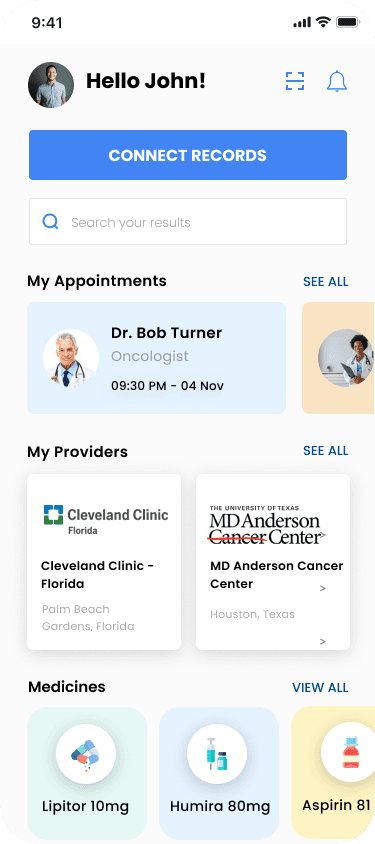
You’ll also want to decide:
Where the patient should land after they return to your app
How you will show progress (for example: “Connecting your records…”, “Connected”)
4) Ability to handle an OAuth redirect callback
Your application must have a route that can receive query parameters from the redirect, including:
code(authorization code)state(for verification)scope(granted scopes)
This can be handled:
By your backend directly, or
By your frontend route that immediately forwards the code to your backend
5) A backend service to exchange the authorization code for tokens
To complete the OAuth flow, your backend must call:
POSThttps://app.consolidate.health/connect/api/v1/token
This request requires HTTP Basic Authentication using:
client_id:client_secret
This is why a backend is required for standard integrations: it keeps the client secret private.
If your architecture is “frontend-only” or a mobile client without a backend, you should contact Consolidate Health about enabling PKCE support.
6) Secure token storage
After token exchange, your system will receive:
access_tokenrefresh_tokenexpires_inpatient_id
Your integration must store these securely, typically server-side:
Encrypt tokens at rest
Limit access to only the services that need them
Associate tokens and
patient_idto the correct user in your product
7) Ability to make authenticated HTTPS requests
All patient data endpoints require:
Authorization: Bearer {access_token}Accept: application/json
You’ll call endpoints under:
https://app.consolidate.health/connect/api/v1/
Data and parameters you must supply during authorization
When redirecting a patient to the authorization endpoint, your app must provide:
client_idredirect_uriscope(use both: patient:read-all offline_access)state(cryptographically random value you generate and verify)emailfirst_namelast_name
Your app should be able to populate these from:
Your authenticated user profile, or
A pre-connection form in your product
Authorization Scopes
patient:read-all
An umbrella scope that allows your application to read all available patient data.
This is the currently supported read scope. More granular scopes (e.g. read-labs, read-medications) may be introduced in the future.
offline_access
Enables your application to refresh expired access tokens without requiring the patient to re-authorize.
If this scope is omitted, access is limited to the current session only and tokens cannot be refreshed after expiration.
Recommended implementation prerequisites
These aren’t strictly required, but they prevent common issues:
1) A plan for state handling
Generate a cryptographically random state
Store it temporarily
Verify it exactly on callback
2) A plan for token refresh
Access tokens expire (your current guide states 6 hours). Your integration should refresh access tokens using the refresh token so users don’t have to reconnect.
3) Logging for debugging
During development, log these events (without logging secrets):
Authorization redirect initiated
Callback received
State verified (pass/fail)
Token exchange success/failure
API request success/failure and HTTP status codes
Quick readiness checklist
You’re ready to begin implementation when you can answer “yes” to all:
I have a Client ID and Client Secret
I have at least one Redirect URI preregistered
I can create a route that receives
code+stateI have a backend endpoint that can call
/tokenusing Basic AuthI have a secure place to store tokens and associate them to a user
I can make HTTPS requests with a Bearer token
Ready to get started? Request Sandbox access
Any other questions? Get in touch